Course: Software Security (KOSEN69) · Week 13 Aligned to: OWASP 2025 A02 Security Misconfiguration · CWE-732 (incorrect permission assignment), CWE-16 (configuration), plus CWE-798, CWE-250, CWE-538, CWE-269, CWE-1104 Signature game: 🔍 Misconfig Hunt (CloudGoat-style) — each misconfig you find and fix = a flag.
⚠️ Ethics note: All artifacts here are deliberately broken for teaching and are marked "Sandbox/teaching only; for authorized lab use." Scan, exploit, and harden only these lab files (or systems you own / are authorized to test). Never point Trivy or these techniques at third-party cloud accounts or images without written permission.
Part 1 — Student Information
| Name | Student ID | Date | Group |
|---|---|---|---|
Part 2 — Lecture Questions
Answer in your own words (2–4 sentences each).
- Explain the shared-responsibility model. In
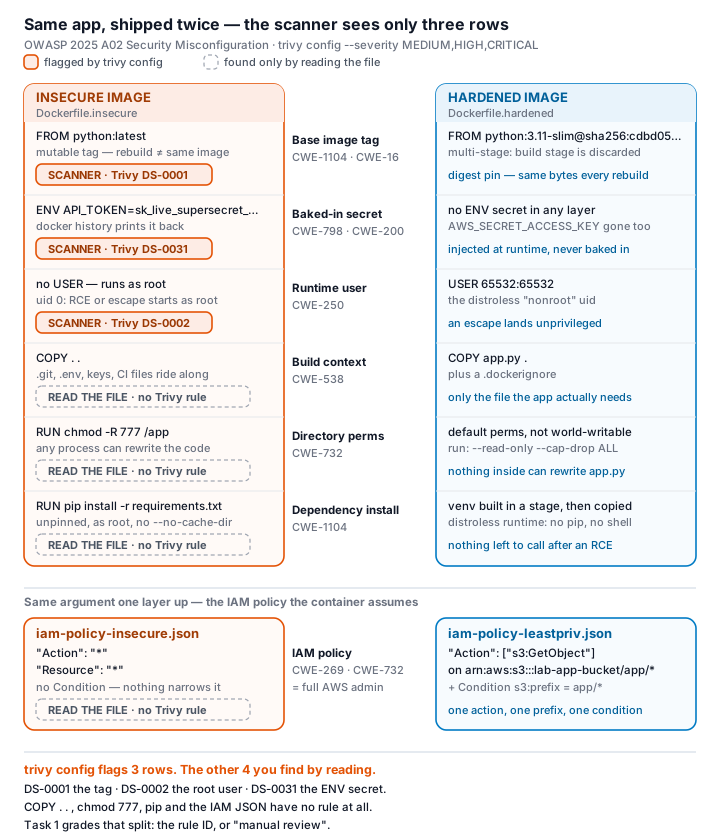
harden.mdit says "the cloud provider secures of the cloud; you secure what you put in it." Give one concrete example of each side for an S3-backed app. iam-policy-insecure.jsonuses"Action": "*"and"Resource": "*". Describe why this violates least privilege and map it to CWE-732 vs CWE-269 — what is the difference between the two CWEs here?- The insecure Dockerfile bakes
ENV API_TOKEN=sk_live_.... Explain how an attacker recovers that secret from a shipped image (name thedockercommands) and why this is CWE-798 / CWE-200. - Why is
FROM python:latest(CWE-1104/CWE-16) a security and reproducibility problem, and how does pinning to an@sha256:digest fix it? - What does a distroless base image remove (relative to
python:3.11-slim), and how does that shrink the attack surface for an RCE or container-escape attacker?
Part 3 — Hands-on Lab (180 min)
Learning goals: find cloud/container misconfigurations with Trivy, map each to a CWE, and rebuild the IAM policy + Dockerfile to least privilege / hardened so the findings drop.
Prerequisites: Docker installed and running; the week13-cloud-container/ lab folder; internet access to pull aquasec/trivy:latest.
Environment setup (real commands)
cd labs/week13-cloud-container

# Option A — the provided wrapper (trivy config over the Dockerfiles; IAM JSON is reviewed manually, see Task 2):
bash scan.sh

# Option B — run Trivy directly (MEDIUM is in the filter on purpose: one of the
# three rules Task 1 asks you to cite is rated MEDIUM, and HIGH,CRITICAL hides it):
docker run --rm -v "$PWD:/src" aquasec/trivy:latest config --severity MEDIUM,HIGH,CRITICAL /src

# (Optional) build + CVE-scan the hardened image:
docker build -f Dockerfile.hardened -t week13-hardened:lab .
docker run --rm -v /var/run/docker.sock:/var/run/docker.sock aquasec/trivy:latest image --severity HIGH,CRITICAL week13-hardened:lab
What to submit per task: the command(s) you ran + the relevant output (finding count or the specific finding line), a screenshot of the Trivy/terminal result, and a 2–3 sentence mitigation explaining why the fix reduces risk (cite the CWE).
Tasks
- Task 0 — Onboarding (15 min). Confirm Docker works (
docker version), runbash scan.sh, and record the baseline finding count againstDockerfile.insecure(Trivy'sconfigscanner does not parse standalone IAM policy JSON, soiam-policy-insecure.jsonis reviewed manually instead — see Task 2). Deliverable: screenshot of the baseline scan.
- Task 1 — Misconfig Hunt: container image (40 min). Goal: find every defect in
Dockerfile.insecure. Steps: read each# DEFECT:comment, then locate the matching Trivy finding where one exists — only 3 of the 6 (unpinned:latest, runs as root, secrets inENV) map to a Trivy config rule (DS-0001,DS-0002,DS-0031);COPY . .,chmod -R 777, and unpinnedpip installare instruction-level RUN/COPY semantics Trivy's Dockerfile scanner doesn't check, so identify those 3 by code review instead. Build a table: defect → CWE → Trivy rule/severity (write "manual review — no Trivy rule" where none exists). Deliverable: completed table (6 rows) using the IDs fromharden.md.
- Task 2 — Misconfig Hunt: IAM (30 min). Goal: document why
iam-policy-insecure.jsonis full-admin. Steps: identify theAction:*/Resource:*/ no-Conditionproblems; map to CWE-269 / CWE-732. Deliverable: 3-row table + one sentence on the blast radius if these creds leak.
- Task 3 — Secrets & storage (25 min). Goal: show secrets must not live in the image. Steps: explain how
ENV API_TOKEN/AWS_SECRET_ACCESS_KEYare exposed viadocker history; propose where they belong instead (secrets manager / mounted secret / orchestrator secret perharden.md). Deliverable: 2–3 sentence remediation + the.dockerignoreentries you would add to stopCOPY . .leaking.git/.env(CWE-538).
- Task 4 — Hardened-Dockerfile + least-priv-IAM defense (50 min). Goal: prove the "after" is clean. Steps: (a) re-run
bash scan.sh(ortrivy config) againstDockerfile.hardenedand capture the reduced finding count (Trivy's config scanner does not parse standalone IAM JSON, so confirm the IAM fix manually per Task 2 by diffingiam-policy-leastpriv.jsonagainst the insecure policy); (b) for the Dockerfile, point to the fix for each Task-1 defect (digest pin, multi-stage venv, distroless runtime,USER 65532:65532, no secrets inENV, copy onlyapp.py); (c) for IAM, confirm the rewrite scopess3:GetObjecttoarn:aws:s3:::lab-app-bucket/app/*and adds thes3:prefixCondition; (d) list the extra runtime flags fromharden.md(--read-only,--cap-drop ALL,--security-opt no-new-privileges). Deliverable: before/after finding counts, the defect→fix mapping, and the diffed policy/Dockerfile with one sentence per fix.
- Task 5 — Flag tally (20 min). Goal: score the hunt. Steps: one flag per misconfig found and fixed (6 container + 3 IAM = 9). Deliverable: flag count + the single biggest-risk misconfig and why.
Part 4 — Reflection
- Mapping. For three findings, write the line of the artifact → CWE → OWASP 2025 A02, and the one-line fix.
- Real incident. Briefly describe a real breach caused by a cloud/container misconfiguration (e.g., a public S3 bucket leak, or an over-permissive IAM role). What single control from this lab would have prevented it?
- Best mitigation. Of everything you did, which control gives the most risk reduction per unit of effort, and why? Argue for least-privilege IAM vs. distroless+non-root.
Grading rubric (100)
| Component | Points | What earns full marks |
|---|---|---|
| Part 2 — Lecture questions | 20 | All 5 answered correctly with CWE/A02 reasoning |
| Part 3 — Tasks + evidence | 40 | Tasks 0–5 complete; commands, outputs, and screenshots present |
| Defense (Task 4 hardening) | 25 | Hardened Dockerfile + least-priv IAM shown to reduce findings; per-fix justification |
| Part 4 — Reflection | 15 | Accurate mapping, relevant incident, well-argued best mitigation |
Evidence & Integrity (required)
- Identity proof: every screenshot/diagram must show a terminal running
printf '%s | %s | ' "$(whoami)" '<YOUR-STUDENT-ID>'; date '+%F %T %Z'in the same image as the evidence. When the evidence is a browser page, a DevTools panel or a rendered response, put that terminal beside the browser and capture the whole screen — a cropped window carries nothing that identifies you, and the lab's own output is byte-identical for the whole cohort by design, so the stamp is the only thing that makes the shot yours. Generic or borrowed evidence is not accepted. - Personalized flag (if this lab issues one): ____________________ Flags are unique per student — submitting another student's flag is a violation. How to submit: learn.zcr.ai/submit (full guide:
SUBMISSION.mdin the repo root). - Explain in your own words (graded on your reasoning, not copied text):
- What did you do, and why did the vulnerability work?
- Why does your fix actually stop it — and what could still break it?
🤖 Audit the AI (required)
AI is a power tool you must distrust — you are graded on your critique, not the AI's answer.
- Ask an AI assistant to exploit or fix this week's vulnerability. Paste its full answer.
- Find what's wrong or risky in it — insecure code, a subtly incomplete fix, a hallucinated API/function/CVE, a missed edge case, or wrong reasoning. Quote the exact line(s).
- Produce the correct, verified version yourself and explain in 2–3 sentences why the AI's output was insufficient.
Disclose your AI use in the Part 1 table. This task counts toward your Defense + Reflection score.
🧠 Comprehension & Prompt (required)
A. Explain in Plain English (EiPE). In 2–3 sentences, in your own words, describe what this week's vulnerable code/endpoint actually does and why it is exploitable — explain the mechanism, don't dump jargon.
B. Prompt Problem. Write a single prompt that makes an AI produce a correct, secure fix for one finding. Run it: does the exploit now fail? If not, refine the prompt and try again. Submit the final prompt + the verified result. Graded on the prompt's precision and your verification — this trains problem decomposition and AI literacy (Denny et al. 2024).